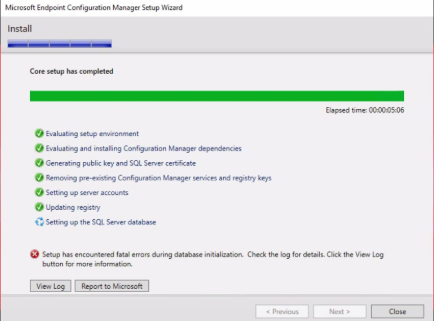
SQL database fatal error occurred during SCCM installation
You are installing SCCM any version which is 2403 or 2509 etc, installing is corrupt during Setting up the SQL Server Database .
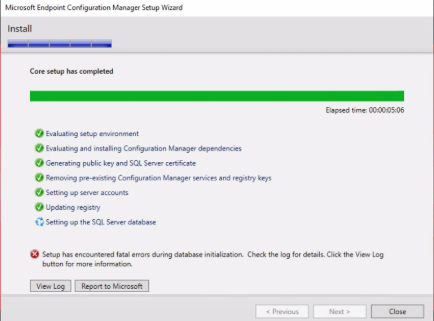
SCCM version: MECM – SCCM 2509
SQL Server: SQL Server 2019 Enterprise – SQL Server Collation(SQL_Latin1_General_CP1_CI_AS)
Problem: SCCM throw error When you are sccm installing. Setup has encountered errors during database initialization. Check the log for details. Click the view log button for more information.
You can see down Some important lines
[ODBC Driver 18 for SQL Server][SQL Server]Cannot insert the value NULL into column 'VersionCode'
'CM_KRT.dbo.LU_LicensedProduct'; column does not allow nulls
ERROR: Failed to import data from CSV files
ConfigMgrSetup.log Details:
INFO: Could not retrieve and process both watermarks, will import all tables from disk.  $$<Configuration Manager Setup><01-09-2026 23:04:07.620-180><thread=3296 (0xCE0)>
INFO: On disk watermark is newer than the one in the database. All tables will be imported.  $$<Configuration Manager Setup><01-09-2026 23:04:07.670-180><thread=3296 (0xCE0)>
INFO: Starting data import data to table: LU_LicensedProduct  $$<Configuration Manager Setup><01-09-2026 23:04:07.714-180><thread=3296 (0xCE0)>
***     MERGE [dbo].[LU_LicensedProduct] AS TARGET ~    using (select [LicensedProductID], [ProductPool], [ProductName], ~                  [FamilyName], [VersionSequence], [VersionCode], ~                  GETUTCDATE() , N'$CD' ~                  from tempdb.dbo.temp_LU_LicensedProduct) ~            as SOURCE ( [LicensedProductID], [ProductPool], [ProductName], ~                        [FamilyName], [VersionSequence], [VersionCode], ~                        [LastUpdated], [SourceSite]) ~    ON SOURCE.[LicensedProductID] = TARGET.[LicensedProductID] ~    when matched and (~        TARGET.[ProductPool] != SOURCE.[ProductPool] OR ~        TARGET.[ProductName] != SOURCE.[ProductName] OR ~        TARGET.[FamilyName] != SOURCE.[FamilyName] OR ~        TARGET.[VersionSequence] != SOURCE.[VersionSequence] OR ~        TARGET.[VersionCode] != SOURCE.[VersionCode] OR ~        TARGET.[SourceSite] != SOURCE.[SourceSite]) ~    then ~    UPDATE SET ~        [ProductPool] = SOURCE.[ProductPool], ~        [ProductName] = SOURCE.  $$<Configuration Manager Setup><01-09-2026 23:04:07.964-180><thread=3296 (0xCE0)>
*** [23000][515][Microsoft][ODBC Driver 18 for SQL Server][SQL Server]Cannot insert the value NULL into column 'VersionCode', table 'CM_KRT.dbo.LU_LicensedProduct'; column does not allow nulls. UPDATE fails.  $$<Configuration Manager Setup><01-09-2026 23:04:08.011-180><thread=3296 (0xCE0)>
INFO: Executing SQL Server command: <    MERGE [dbo].[LU_LicensedProduct] AS TARGET ~    using (select [LicensedProductID], [ProductPool], [ProductName], ~                  [FamilyName], [VersionSequence], [VersionCode], ~                  GETUTCDATE() , N'$CD' ~                  from tempdb.dbo.temp_LU_LicensedProduct) ~            as SOURCE ( [LicensedProductID], [ProductPool], [ProductName], ~                        [FamilyName], [VersionSequence], [VersionCode], ~                        [LastUpdated], [SourceSite]) ~    ON SOURCE.[LicensedProductID] = TARGET.[LicensedProductID] ~    when matched and (~        TARGET.[ProductPool] != SOURCE.[ProductPool] OR ~        TARGET.[ProductName] != SOURCE.[ProductName] OR ~        TARGET.[FamilyName] != SOURCE.[FamilyName] OR ~        TARGET.[VersionSequence] != SOURCE.[VersionSequence] OR ~        TARGET.[VersionCode] != SOURCE.[VersionCode] OR ~        TARGET.[SourceSite] != SOURCE.[SourceSite]) ~    then ~    UPDATE SET ~        [ProductPool] = SOURCE.[ProductPool], ~        [ProductName] = SOURCE.[ProductName], ~        [FamilyName] = SOURCE.[FamilyName], ~        [VersionSequence] = SOURCE.[VersionSequence], ~        [VersionCode] = SOURCE.[VersionCode], ~        [LastUpdated] = SOURCE.[LastUpdated], ~        [SourceSite] = SOURCE.[SourceSite] ~    when not matched by TARGET then ~        INSERT([LicensedProductID], [ProductPool], [ProductName], [FamilyName], [VersionSequence], [VersionCode], ~                [LastUpdated], [SourceSite]) ~        VALUES(SOURCE.[LicensedProductID], SOURCE.[ProductPool], SOURCE.[ProductName], ~               SOURCE.[FamilyName], SOURCE.[VersionSequence], SOURCE.[VersionCode], ~               SOURCE.[LastUpdated], SOURCE.[SourceSite]); ~    TRUNCATE TABLE tempdb.dbo.temp_LU_LicensedProduct  ~>  $$<Configuration Manager Setup><01-09-2026 23:04:08.058-180><thread=3296 (0xCE0)>
ERROR: Failed to execute SQL Server script:     MERGE [dbo].[LU_LicensedProduct] AS TARGET ~    using (select [LicensedProductID], [ProductPool], [ProductName], ~                  [FamilyName], [VersionSequence], [VersionCode], ~                  GETUTCDATE() , N'$CD' ~                  from tempdb.dbo.temp_LU_LicensedProduct) ~            as SOURCE ( [LicensedProductID], [ProductPool], [ProductName], ~                        [FamilyName], [VersionSequence], [VersionCode], ~                        [LastUpdated], [SourceSite]) ~    ON SOURCE.[LicensedProductID] = TARGET.[LicensedProductID] ~    when matched and (~        TARGET.[ProductPool] != SOURCE.[ProductPool] OR ~        TARGET.[ProductName] != SOURCE.[ProductName] OR ~        TARGET.[FamilyName] != SOURCE.[FamilyName] OR ~        TARGET.[VersionSequence] != SOURCE.[VersionSequence] OR ~        TARGET.[VersionCode] != SOURCE.[VersionCode] OR ~        TARGET.[SourceSite] != SOURCE.[SourceSite]) ~    then ~    UPDATE SET ~        [ProductPool] = SOURCE.[ProductPool], ~        [ProductName] = SOURCE.[ProductName], ~        [FamilyName] = SOURCE.[FamilyName], ~        [VersionSequence] = SOURCE.[VersionSequence], ~        [VersionCode] = SOURCE.[VersionCode], ~        [LastUpdated] = SOURCE.[LastUpdated], ~        [SourceSite] = SOURCE.[SourceSite] ~    when not matched by TARGET then ~        INSERT([LicensedProductID], [ProductPool], [ProductName], [FamilyName], [VersionSequence], [VersionCode], ~                [LastUpdated], [SourceSite]) ~        VALUES(SOURCE.[LicensedProductID], SOURCE.[ProductPool], SOURCE.[ProductName], ~               SOURCE.[FamilyName], SOURCE.[VersionSequence], SOURCE.[VersionCode], ~               SOURCE.[LastUpdated], SOURCE.[SourceSite]); ~    TRUNCATE TABLE tempdb.dbo.temp_LU_LicensedProduct  ~  $$<Configuration Manager Setup><01-09-2026 23:04:08.105-180><thread=3296 (0xCE0)>
ERROR: SQL Server error: <>  $$<Configuration Manager Setup><01-09-2026 23:04:08.152-180><thread=3296 (0xCE0)>
***     IF OBJECT_ID('tempdb.dbo.temp_LU_LicensedProduct') IS NOT NULL  ~           DROP TABLE tempdb.dbo.temp_LU_LicensedProduct ~  $$<Configuration Manager Setup><01-09-2026 23:04:08.199-180><thread=3296 (0xCE0)>
*** [24000][0][Microsoft][ODBC Driver 18 for SQL Server]Invalid cursor state  $$<Configuration Manager Setup><01-09-2026 23:04:08.246-180><thread=3296 (0xCE0)>
INFO: Executing SQL Server command: <    IF OBJECT_ID('tempdb.dbo.temp_LU_LicensedProduct') IS NOT NULL  ~           DROP TABLE tempdb.dbo.temp_LU_LicensedProduct ~>  $$<Configuration Manager Setup><01-09-2026 23:04:08.292-180><thread=3296 (0xCE0)>
ERROR: FAILED to import data to table LU_LicensedProduct  $$<Configuration Manager Setup><01-09-2026 23:04:08.339-180><thread=3296 (0xCE0)>
ERROR: Failed to import data from CSV files  $$<Configuration Manager Setup><01-09-2026 23:04:08.386-180><thread=3296 (0xCE0)>
ERROR: Failed to import Asset Intelligence data into the site database.~  $$<Configuration Manager Setup><01-09-2026 23:04:08.636-180><thread=3296 (0xCE0)>
Not recovery mode or not top level site. Skip restoring client piloting packages.  $$<Configuration Manager Setup><01-09-2026 23:04:08.683-180><thread=3296 (0xCE0)>
Steps:
During installing, SCCM successfully connected to the SQL Server then created CM_CODE database
Steps: Setting up the SQL server Database
The SCCM setup wizard successfully created dbo.temp_LU_XX table in the dbo.tempdb database. However, the dbo.temp_LU_XX is empty and doesn’t contain any data which causes error messages. The setup process returns error messages.
Solve:
SQL Server collation must be set to SQL_Latin1_General_CP1_CI_AS
The source of this problem is the ODBC driver version 18.6.1. So, You can change the ODBC driver version. You have to downgrade the ODBC Driver Version. You should install ODBC Driver 18.5.2.1 or ODBC Driver 18.5.1.1. and restart your computer.
certlm.msc > Personel > You will see the certificate used by SQL Server Certificate. You should copy the certificate and then paste it into the Trusted Root Certification Authorities store. The certificate will be trusted bt the system.
Start the SCCM setup wizard. Then uninstall it and wait. Finally, if the database contains the dbo.temp_LU table, delete it.
You try installing SCCM Setup.
Try to install the SCCM Setup Wizard again